
Tour the interface
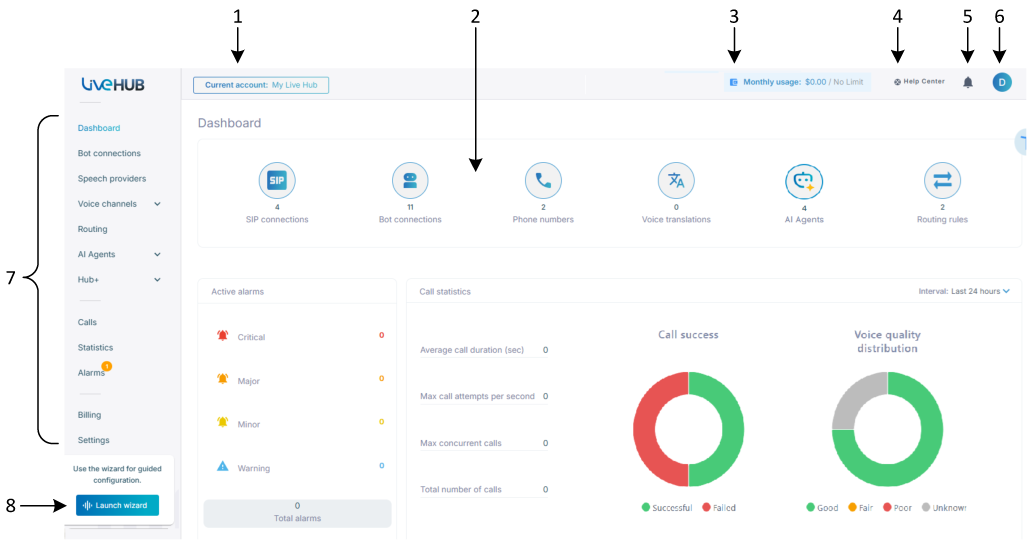
The numbered callouts in the screenshot below identify the main areas of the Live Hub window. The following table describes each area.
| # | Area | What it is |
|---|---|---|
| 1 | Current account | The account you're currently using. Click it to switch accounts, create an account, or open Access control (IAM). Any configuration changes you make apply to the account shown here. |
| 2 | Main pane | The screen opened by the selected menu. |
| 3 | Credit or usage | For a prepaid account, this shows the current credit balance; click it to open Billing and payments. For a postpaid account, it shows the month-to-date usage in dollars. |
| 4 | Help Center | Opens a menu of help and support options. For more information, see Support. |
| 5 | Notifications | Displays recent notifications. |
| 6 | Your profile | Your profile icon, account name and ID, with User profile to edit your profile and Logout to sign out. |
| 7 | Navigation pane | Displays the available menus, listed below. |
| 8 | Launch wizard | Starts the quick setup wizard. The wizard runs automatically the first time you sign in. After that, you can start it from here. |
The navigation pane
The navigation pane contains the following menus. Select a menu to open its screen in the main pane.
| Menu | What it holds |
|---|---|
| Dashboard | Provides an overview of the account, including configuration counts, active alarms, and key call statistics. Live Hub opens to the Dashboard when you sign in. For more information, see Dashboard. |
| Bot connections | Your bot connections and the features enabled for each connection. For more information, see Bot connections. |
| Speech providers | Speech-to-text and text-to-speech services. See Speech providers. |
| Voice channels | Expands to Phone numbers, SIP connections, WhatsApp numbers and Microsoft Teams. See Voice channels. |
| Routing | Routing rules, routing groups and call block lists. See Routing. |
| AI Agents | Agents built and run natively on Live Hub, with their flows, tools, documents and models. See AI Agents. |
| Hub+ | Expands to Voice translation and Outbound automation. See Hub+. |
| Calls | Call history, live calls, recordings and transcripts. See Calls. |
| Statistics | Call activity over a period — success, quality, concurrency, duration. See Statistics. |
| Metrics | Dashboards that you build yourself from the same call data. See Metrics (Preview). |
| Alarms | Displays active and historical alarms. For more information, see Alarms. |
| Billing | Credit, billing models and reports. See Billing and payments. |
| Settings | Account name, call limits, email address, billing address and retention periods. See Account settings. |
| Subaccounts | Parent accounts only — the accounts beneath this one. See Accounts. |
Available menus depend on your permissions. For more information, see Policies and roles.